


- Please keep it well! This new version of the user manual for material balancing
After months of meticulous development, the new material balancing function will be launched simultaneously with the Digital Sulfuric acid V1.2 version! This update has made multiple improvements to the material balance. The main functional modules include device information, historical trends, simulation diagnosis, and diagnosis reports. Among them, the simulation diagnosis function has been comprehensively upgraded on the original basis, including the user interface (UI), operation mode and calculation formula, aiming to provide you with a better online device simulation experience! To help you quickly familiarize yourself with and make full use of the new material balancing function, please read the following material balancing user manual carefully!
1. Introduction to Basic Functions
1.1 Device Information - View and modify device equipment parameters
In the device information function, you need to input basic information such as device scale, device load, and total conversion rate, so that when entering the simulation diagnosis function, the system can perform calculations based on the situation of your device. When you enter 40 or 80 in the device size field, the system will automatically pop up a prompt asking if you need to automatically supplement the relevant data. After the data supplementation is completed, you can fine-tune individual data points to enhance the accuracy of the simulated diagnosis. Please note that the standard acid concentration is 100%.
.jpg)
Device information The supplemented data of 400,000 tons per year
1.2 Historical Trends - View the historical operating trends of the equipment
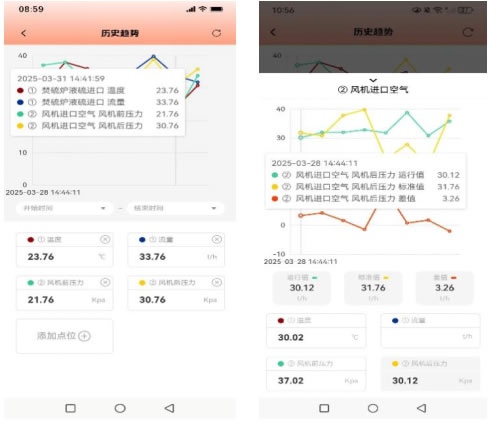
In the historical trend function, you can select the start and end times of the device's operation and specify multiple points that need to be viewed. Subsequently, the system will display the data trends of these points at different time points (provided that you have saved multiple sets of data in the simulation diagnosis, the corresponding curves and data will be shown in the historical trends). In addition, if you wish to gain a deeper understanding of the data details of a certain point, simply click on the cell corresponding to the data in the lower half of the area.
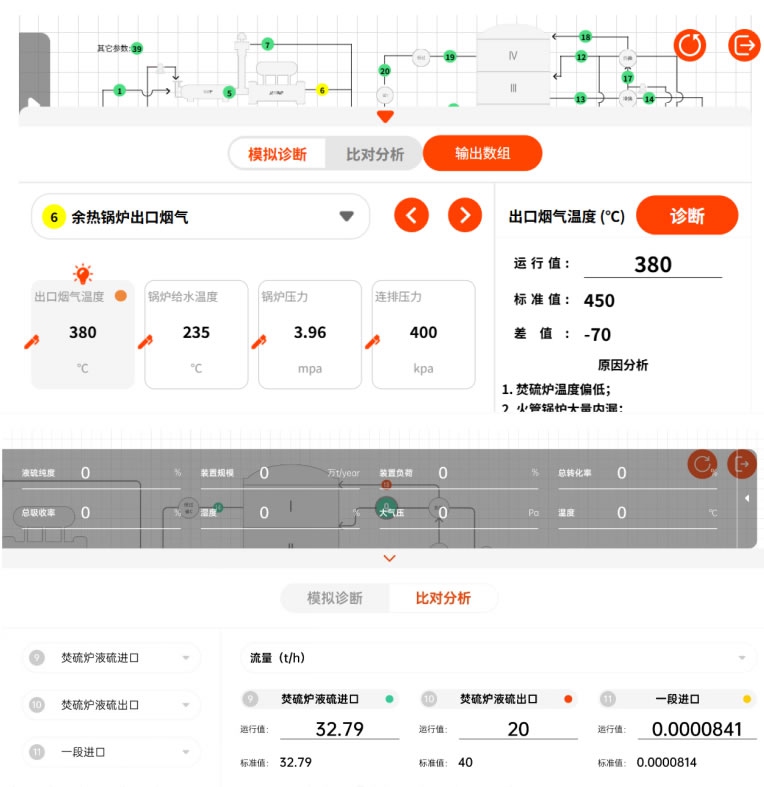
1.3 Simulation Diagnosis - Simulation diagnosis of the operating status of the device equipment
In the simulation diagnosis function, we provide a set of sulfur-material balance diagrams as the default device diagrams. The data displayed in the simulation diagnosis interface are all calculated based on the data you filled in the device information. Of course, you can also interfere with the calculated standard value by clicking on the "Workbench" at the bottom or the device information panel on the left to modify the running value. In addition, we have provided a "diagnostic function" for some points. When the diagnostic buttons at certain points show an "orange" highlight, it indicates that diagnostic operations can be performed at that point. The system will compare the difference between the running value you input and the calculated standard value, adjust the color of the point position according to the difference situation, and output the corresponding low or high analysis statement at the same time to help you quickly locate the cause of the difference.
The comparison and analysis function enables you to select any data from up to three different points for direct comparison of multi-dimensional data of the device, thereby gaining a clearer understanding of the correlations among the data.
The buttons in the upper right corner are reset and exit in sequence. The reset button will lock the current resolution to 0.9 to display the full picture of the entire image, while presenting the device information bar and the workbench. The exit button will return to the main interface of the material balance function and save the simulation data of this time, ensuring that when you enter the material balance function next time, the data of your last operation can be reproduced.
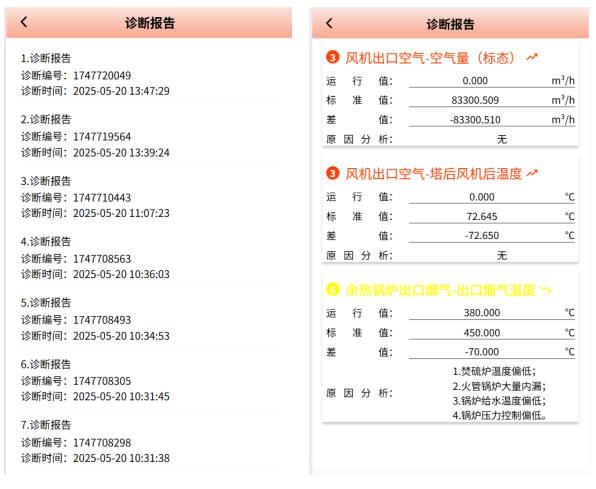
1.4 Diagnostic Report - Check the diagnostic report of the device and equipment
In the diagnostic report function, you can view the abnormal point information generated when using the simulation diagnostic function. By clicking on the diagnosis report, you can obtain more detailed information about this simulation diagnosis.
2. Basic operation process
2.1 Improve "Device Information".
2.2 Enter "Simulation Diagnosis".
2.3 Go to "Historical Trends" or "Diagnostic Reports" to review the data from the simulation process.
3 Functional Details
3.1 Point color
The color of the point positions is classified as yellow to low, green to normal, and red to high. The color of the point position will change based on the feedback of the difference after you perform the "diagnosis" operation.
3.2 Operating Values and Standard Values
The running value is determined by the data you input, while the standard value is calculated by combining the running value you input with the formula.
It is particularly important to note that when using the material balance function for the first time, the type of point data filled in the device information should be uniformly set to the operating value and the standard value, and the two should be equal. These points belong to the same type as those marked with a "pencil" in the diagnostic simulation. Whether it is the initial modification of the point data in the device information or the multiple modifications of the operation values marked with "pencil" during the simulation diagnosis, it will affect the calculation result of the final standard value.
It should be noted that after you have completely saved the diagnostic simulation data for the first time, if you modify the point data in the device information again, these modifications will be regarded as not participating in the calculation and will only be used as standard values for comparison.
3.3 Details Panel
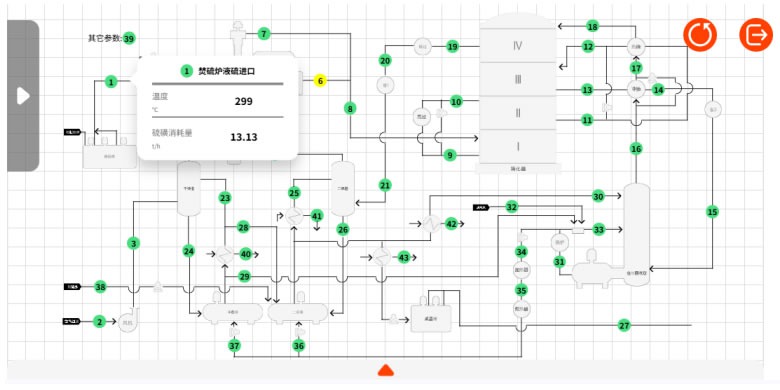
In the simulation diagnosis, clicking on a point on the page will pop up a detailed panel of the data to which the point belongs, making it convenient for you to quickly view the relevant data. If you click on the workbench again, the data information of the corresponding point will be displayed.
The above is all the content about the update of Digital sulfuric acid version V1.2. If you encounter any questions during the operation or have better suggestions, you are welcome to join the digital sulfuric acid exchange group. We sincerely look forward to your joining us!